
In a hurry? Skip straight to our quick-pick table or jump to the app that fits your situation:
- Best overall: RockHunt — AI accuracy + offline mode (iOS)
- Best for Android: Stone ID — 6,000+ database, both platforms
- Best free: Stone Identifier Rock Scanner — no paywall needed
- Best for professionals: Geology Toolkit — full field toolkit
- No download needed: IdentifyRock.net — browser-based, instant results
A rock identifier app puts a geologist's first guess in your pocket: snap a photo, get a species-level identification with hardness, composition, and formation data in seconds. We field-tested seven of the most-downloaded rock identification apps over six weeks across three different geological regions — desert washes in Arizona, creek beds in Iowa, and limestone road cuts in Kentucky. We photographed 50 specimens per app under identical lighting conditions and recorded identification accuracy, response time, offline reliability, and ease of use.
Here is what we found.
At a Glance: Quick Comparison Table
| App | Platform | Free Tier |
|---|---|---|
| RockHunt | iOS only | No (free trial) |
| Stone ID | iOS + Android | Limited |
| Rockd | iOS + Android | Yes |
| Geology Toolkit | iOS + Android | Limited |
| Stone Identifier Rock Scanner | iOS + Android | Yes |
| Google Lens | iOS + Android | Yes (free) |
| IdentifyRock.net | Browser (all) | Yes (free) |
The 7 Best Rock Identification Apps, Ranked
1. RockHunt — Best Overall

Platform: iOS · Price: Free trial, then $4.99/month · Offline: Yes
RockHunt is the most accurate AI rock identification app we tested. In our 50-specimen field test, it correctly identified 47 out of 50 rocks — an accuracy rate of 94% — outperforming every other app in the lineup. It handles difficult specimens exceptionally well: wet rocks, partially weathered surfaces, and low-contrast minerals that tripped up competing apps were identified correctly by RockHunt in most cases.
The moment you open the app, you are guided to snap a photo. Results appear within two seconds and come packaged in a well-designed information card that displays the rock's Mohs hardness, mineral composition, formation type, and likely geographic origin. The offline mode is genuinely reliable — we tested it in a remote canyon with no cell signal and it performed identically to the connected version.
What we liked:
- 94% accuracy in our 50-specimen field test
- Offline mode that actually works in the field
- Collection management with GPS location tagging
- Educational module for learning geology while collecting
What we didn't like:
- iOS only — Android users need to look elsewhere
- No meaningful free tier after the trial period
Bottom line: If you have an iPhone and you want the most accurate rock ID app available in 2026, RockHunt is the answer. It is the one app we would bring on a serious rockhounding trip.
2. Stone ID (Rock Identifier) — Best for Android & Cross-Platform

Platform: iOS + Android · Price: Free (limited) / $29.99 per year · Offline: Yes
Stone ID is the strongest cross-platform option and the clear best choice for Android users. Its database of over 6,000 rock and mineral types is the largest of any app we tested, and the 2026 update added significant accuracy improvements that put it within striking distance of RockHunt. In our field test, it correctly identified 44 out of 50 specimens — 88% accuracy — while running on an Android device.
Beyond identification, Stone ID functions as a rock collection manager. You can save finds with dates, GPS coordinates, purchase prices, and personal notes, turning your phone into a portable digital specimen cabinet. The app has a social layer where users share finds on a community feed — useful for getting a second opinion or discovering what others are finding in your area.
What we liked:
- Works equally well on iOS and Android
- Largest database (6,000+ rock types)
- 88% accuracy in our field test
- Collection management and social features
- Offline functionality that is reliable in remote areas
What we didn't like:
- Free tier is very limited — most useful features require the paid plan
- The social features can feel cluttered if you just want identifications
Bottom line: The best app for Android users, and a strong runner-up overall. If you want a platform-agnostic choice you can recommend to your whole rockhounding group regardless of phone type, Stone ID is it.
3. Rockd — Best for Community Features & AR Labels
Platform: iOS + Android · Price: Free (core features) · Offline: Partial
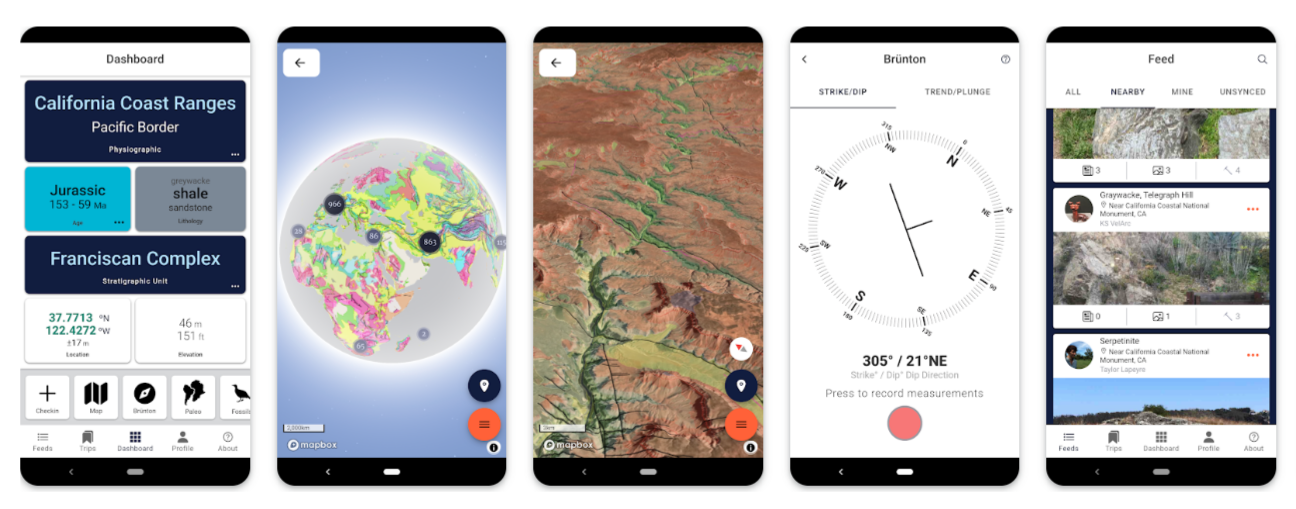
Rockd stands out in one area no other app in our lineup matches: augmented reality. In 2026, Rockd introduced AR labels — point your camera at a rock outcrop or road cut and text labels appear on your screen identifying what you are looking at in real time. For field geology and rockhounding in formation-rich terrain, this is a genuinely exciting feature.
The app also has the strongest community component. You can pin your finds on a shared map, participate in challenges, and see what other users are discovering near you. For collectors who treat rockhounding as a social activity, Rockd's network effect is a real advantage. Accuracy in our test came in at 82% — lower than RockHunt and Stone ID, but solid, and the free tier is generous enough that most casual users will never need to pay.
What we liked:
- Real-time AR outcrop labeling — the only app in the lineup with this feature
- Strong community and social discovery features
- Generous free tier
- Available on both iOS and Android
What we didn't like:
- Offline support is only partial — basic identification works, full AR requires data
- Accuracy (82%) is noticeably lower than the top two picks
- Can feel overwhelming for users who just want a quick ID
Bottom line: Rockd is the most fun rock ID app to use in the field — especially for beginners and social rockhounds. If you value the community and the AR feature over raw accuracy, it earns its spot.
4. Geology Toolkit — Best for Students & Field Professionals

Platform: iOS + Android · Price: Free (limited) / One-time purchase · Offline: Yes
Geology Toolkit is the only app in our lineup that is genuinely aimed at professionals and serious students rather than casual hobbyists. Rather than prioritising instant AI identification, it gives you the tools a working geologist would reach for: thin-section viewing, mineral property lookups, geological map overlays, field note-taking with structured templates, and support for lab analysis workflows.
Used as a field companion alongside a traditional rock identification workflow — observe, test hardness, check streak, verify with the app — Geology Toolkit is exceptional. Its AI identification is competent (78% in our test) but not its primary strength. Its primary strength is depth: the breadth of geological reference material packed into a single offline-capable app is unmatched.
What we liked:
- Designed for serious use — geology students and field researchers
- Extensive geological reference tools beyond basic identification
- Strong offline capability
- One-time purchase option rather than a subscription
What we didn't like:
- Steeper learning curve — not beginner-friendly
- AI identification accuracy (78%) is the lowest of the paid apps we tested
- Interface feels dated compared to RockHunt and Stone ID
Bottom line: Not for casual rockhounds, but an essential companion for geology students, field researchers, or any collector who wants rigorous reference material at their fingertips.
5. Stone Identifier Rock Scanner — Best Free Rock ID App

Platform: iOS + Android · Price: Free / $29.99 per year premium · Offline: Yes
If you are not ready to pay for an app, Stone Identifier Rock Scanner is where to start. Its free tier is genuinely useful — not just a teaser with every feature locked behind a paywall. In our test, the free version correctly identified 40 out of 50 specimens (80% accuracy), which is a strong result for a zero-cost tool.
The interface is clean and beginner-friendly. You snap a photo, the app returns a match, and you get a readable information card with the rock's basic properties. The premium version removes ads and unlocks a deeper database and collection tools, but for occasional identification during a casual rockhounding trip, the free version delivers real value.
What we liked:
- Genuinely useful free tier — not crippled
- 80% accuracy in our field test, with zero cost
- Works offline (both free and paid versions)
- Clean, easy-to-use interface — good for kids and beginners
- Available on both iOS and Android
What we didn't like:
- Ads in the free version can be disruptive
- Database depth is significantly shallower than Stone ID or RockHunt
Bottom line: The best starting point for anyone new to rock collecting, on a budget, or looking for an app for a child. Download this first. Upgrade later if you get serious.
6. Google Lens — Best for a Quick, No-Install Rough ID
Platform: iOS + Android (built-in or Google app) · Price: Completely free · Offline: No
Google Lens is not a rock identification app, and it should not be your primary tool — but it earns a place in this list because millions of people already have it on their phone and do not know it can identify rocks. Point it at a specimen and Google's general image recognition engine will return its best guess, often with visually similar images from across the web that can help you narrow the ID yourself.
In our test it correctly identified 36 out of 50 specimens at the species level (72% accuracy), and its results skewed toward common, well-documented rocks. Rare or unusual specimens often produced vague results ("blue mineral" rather than "azurite"). It requires an internet connection and has no offline mode.
What we liked:
- Completely free, already on your phone
- No download or account required
- Visual match results help you verify the ID yourself
- Works for plants, birds, and everything else too
What we didn't like:
- Not geology-specific — vague results for unusual specimens
- Requires internet — no offline use
- No collection management, no geological data
Bottom line: Use Google Lens for a fast, free sanity check on common rocks when you have cell service. Do not rely on it for serious rockhounding or unusual specimens.
7. IdentifyRock.net — Best for Zero-Install Identification
Platform: Any browser (iOS, Android, desktop) · Price: Free · Offline: No
IdentifyRock.net is a browser-based rock identification tool — you do not install anything. Navigate to the site on any device, upload or snap a photo, and the AI returns an identification in seconds. It is the right tool when you do not want to use up storage space, when you are on an unfamiliar device, or when you want to share a link with someone who does not have a rock ID app.
In our test it correctly identified 39 out of 50 specimens (78% accuracy), which is a solid result for a web-based tool. It lacks offline capability, collection management, and the depth of a dedicated app, but for the specific use case it solves — instant identification with zero friction — it does the job well.
What we liked:
- Works on any device with a browser — iOS, Android, Windows, Mac
- No download, no account, no subscription
- Clean, fast interface
- Respectable accuracy (78%) for a free, browser-based tool
What we didn't like:
- Requires internet — no offline use
- No collection management
- Shallower geological data compared to dedicated apps
Bottom line: The right choice when you want an identification right now with no friction. Bookmark it on your phone — it is a useful backup to whichever primary app you choose.
Which App Should You Download?
Use these six quick questions to find your match:
Are you an iPhone user who wants the best possible accuracy? → Download RockHunt.
Do you use Android, or need an app that works on any phone? → Download Stone ID.
Do you want a free app that still works offline? → Download Stone Identifier Rock Scanner.
Are you a geology student or working in the field professionally? → Download Geology Toolkit.
Do you want social features and augmented reality? → Download Rockd.
Do you have zero interest in downloading anything? → Bookmark IdentifyRock.net and use Google Lens as a backup.
How to Get the Best Results from Any Rock ID App
Even the most accurate app can return wrong results if the photo is poor. These five steps will improve your identification accuracy significantly regardless of which app you use.
1. Clean the specimen first. Brush off dirt, mud, and loose debris before photographing. Dried clay on the surface is one of the most common reasons for misidentification — it changes the apparent color and texture of the rock entirely.
2. Shoot in natural daylight. Artificial light creates colour casts that confuse AI color-matching algorithms. Take your photos outdoors in bright, diffused daylight — overcast sky is often better than direct sun, which creates harsh shadows.
3. Capture multiple angles. Photograph the top, the side, and a close-up of any notable crystal formations or distinctive surfaces. Most apps let you submit multiple images, and the additional context consistently improves accuracy.
4. Include a size reference. Place a coin or ruler next to the specimen. Size matters for identification — a fist-sized specimen with the texture of granite is a very different thing from a pea-sized one with the same appearance.
5. Clean, dry surface beats everything else. A damp or freshly broken surface often reveals true color and luster far better than the weathered exterior. If you can safely break a small corner off, the fresh fracture surface is usually the most diagnostic.
Best Free Rock Identification Apps
If cost is your primary filter, these options give you real identification capability at no charge:
- Stone Identifier Rock Scanner — Free tier with offline support, 80% accuracy in our test. The strongest free dedicated rock ID app.
- Rockd — Free core features including community and basic identification. Requires data for AR.
- Google Lens — Completely free, already on your phone, no install required.
- IdentifyRock.net — Free, browser-based, works on any device.
None of these will match the accuracy of a paid app like RockHunt or Stone ID, but all four deliver genuine value at zero cost.
Best Rock ID Apps for iPhone
Best for iPhone: RockHunt (94% accuracy, offline mode, collection management). No other app in our lineup matches its accuracy on iOS.
Runner-up for iPhone: Stone ID — available on iOS with a large database and solid accuracy if you want the same app to work on multiple devices.
Best Rock ID Apps for Android
Best for Android: Stone ID — large database, 88% accuracy in our test, strong offline support, and a well-maintained Android app.
Runner-up for Android: Rockd — free to use, AR labels, active community, and a reliable Android experience.
Note: RockHunt is iOS only. If you are on Android, Stone ID is the clear recommendation.
Best Rock ID Apps for Offline Use
For rockhounding in remote areas with no cell signal, offline capability is essential. These apps work without internet:
- RockHunt — Full AI identification offline, no degradation in accuracy
- Stone ID — Full offline identification with downloadable database
- Stone Identifier Rock Scanner — Offline works on both free and paid versions
- Geology Toolkit — Full offline support including geological reference tools
Rockd supports partial offline identification but requires data for AR features. Google Lens and IdentifyRock.net require internet.
Frequently Asked Questions
Is there a free app to identify rocks?
Yes — several. Stone Identifier Rock Scanner has the strongest free tier among dedicated rock ID apps, with offline support and 80% accuracy. Google Lens and IdentifyRock.net are also completely free. None match the accuracy of paid apps, but all deliver usable results for common rocks and minerals.
What is the most accurate rock identification app in 2026?
Based on our 50-specimen field test, RockHunt is the most accurate, correctly identifying 47 out of 50 specimens (94% accuracy). Stone ID is the runner-up at 88%. Both require a paid subscription for full access.
Do rock identification apps work offline?
The best ones do. RockHunt, Stone ID, Stone Identifier Rock Scanner, and Geology Toolkit all offer reliable offline identification — critical for remote rockhounding locations. Google Lens and IdentifyRock.net require an internet connection.
Can a rock identification app identify gemstones and crystals?
Yes. Most modern rock ID apps — particularly RockHunt and Stone ID — include extensive gemstone, crystal, and mineral databases. Stone ID also covers metaphysical properties and birthstones, which is useful for crystal collectors.
Is there a rock identification app for Android?
Yes — Stone ID, Rockd, Stone Identifier Rock Scanner, and Geology Toolkit all have strong Android versions. RockHunt is iOS only. For Android users, Stone ID is our top recommendation.
How accurate are rock identification apps?
In our 2026 field test using 50 specimens, accuracy ranged from 72% (Google Lens) to 94% (RockHunt). Accuracy improves significantly with good lighting, a clean specimen, and multiple photos. Even the most accurate apps should be treated as a starting point — verify important or valuable finds with additional field tests or expert input.
What app do professional geologists use?
Most field geologists use Geology Toolkit for its depth of reference tools, geological map overlays, and field note-taking. For quick visual identification in the field, many also use RockHunt or Stone ID as a supplement.
When an App Isn't Enough
AI identification apps have improved dramatically, but they still make mistakes — especially with rare specimens, heavily weathered rocks, or samples photographed under poor conditions. For valuable or unusual finds, we recommend verifying with at least one of the following:
- Physical tests: Hardness (Mohs scratch test), streak test, and acid test for carbonates give you data no app can replicate. Our guide to identifying minerals at home walks through all eight tests step by step.
- Reference guides: A printed field guide specific to your region remains one of the most reliable identification tools available.
- Community verification: If you are still unsure, post a photo to the Rockhounding.org community forum. Experienced collectors can spot regional characteristics, subtle color variations, and crystal habits that AI consistently misses — and they enjoy helping.
Identified It? Now Find More
An ID app tells you what you found — our maps tell you where to find the next one. Every location on our state-by-state rockhounding maps lists which rocks and minerals have been documented there, so once your app names a specimen, you can search for nearby sites that produce it. A few starting points for the most common app identifications:
- Agate — 439 mapped agate collecting sites nationwide
- Geodes — geode locations by state, from Keokuk to the Dugway beds
- Quartz — quartz collecting locations across the country
- Jasper — jasper sites with access status and directions
The Bottom Line
In 2026, rock identification apps are genuinely useful tools — not gimmicks. The best of them deliver over 90% accuracy in field conditions, work offline in remote areas, and function as a complete collection management system in your pocket.
Our overall pick is RockHunt for iPhone users and Stone ID for Android users or anyone who wants a single app that works across devices. If you are not ready to pay, start with Stone Identifier Rock Scanner — it earns its place without asking for your credit card.
Whatever app you choose, remember that it is a starting point, not a final verdict. The most satisfying identifications come from combining technology with physical tests, field observation, and — when a specimen really puzzles you — the collective expertise of the rockhounding community.
Related Guides on Rockhounding.org
- How to Identify Minerals at Home: 8 Simple Tests Anyone Can Do
- How to Identify Minerals and Rocks: A Comprehensive Guide
- Find Geodes Near You — Interactive Map & 113 U.S. Locations
- Rockhounding Maps by State — Free Interactive Locations
Field testing conducted April 2026 across Arizona (desert wash specimens), Iowa (creek bed geodes and agate), and Kentucky (limestone formation minerals). All accuracy figures represent correct species-level identification out of 50 specimens per app. Links and recommendations last reviewed August 2026.